
Interpolation of Fields
In optical simulations we often need to resample fields between grids of different resolution or structure. This notebook covers linear and nearest-neighbor interpolation, boundary handling, and working with unstructured grids in HCIPy. Fields can be complex-valued (as is common in optical simulations with amplitude and phase); interpolation works component-wise on the real and imaginary parts.
import hcipy
from hcipy.interpolation import make_linear_interpolator, make_nearest_interpolator
import numpy as np
import matplotlib.pyplot as plt
Let’s create a Gaussian field on a coarse grid and interpolate it onto a finer grid to see how the interpolator fills in missing information between grid points.
We’ll use a 32×32 coarse grid and a 128×128 fine grid, both spanning the same physical area of 2 × 2 units. That gives us a 4× linear oversampling factor — each coarse pixel is replaced by 4×4 fine pixels, making the interpolation error easy to examine.
# Coarse and fine grids
coarse_grid = hcipy.make_pupil_grid(32, 2.0)  # 32x32 grid
fine_grid = hcipy.make_pupil_grid(128, 2.0)   # 128x128 grid covering same area

print(f"Coarse grid: {coarse_grid.dims} points, spacing {coarse_grid.delta}")
print(f"Fine grid: {fine_grid.dims} points, spacing {fine_grid.delta}")

# Gaussian field on coarse grid
x, y = coarse_grid.x, coarse_grid.y
coarse_field = hcipy.Field(np.exp(-(x**2 + y**2) / 0.5), coarse_grid)
Coarse grid: (32, 32) points, spacing [0.0625 0.0625]
Fine grid: (128, 128) points, spacing [0.015625 0.015625]
We now have a coarse representation of the Gaussian on 1024 points (32×32) and a fine 128×128 target to interpolate onto. The 4× ratio is large enough to make interpolation artifacts visible but small enough that linear interpolation should still perform well on a smooth field.
Now let’s build the interpolator and evaluate it on the fine grid.
# Linear interpolator
interpolator = hcipy.make_linear_interpolator(coarse_field)

# Interpolate
fine_field = interpolator(fine_grid)
The interpolated field is computed. Let’s compare it side by side with the original and look at the error.
# Visualize
fig, axes = plt.subplots(1, 3, figsize=(15, 4))

hcipy.imshow_field(coarse_field, ax=axes[0])
axes[0].set_title(f'Original (coarse)\n{coarse_grid.dims}')

hcipy.imshow_field(fine_field, ax=axes[1])
axes[1].set_title(f'Interpolated (fine)\n{fine_grid.dims}')

# Interpolation error
x_fine, y_fine = fine_grid.x, fine_grid.y
reference_field = hcipy.Field(np.exp(-(x_fine**2 + y_fine**2) / 0.5), fine_grid)
hcipy.imshow_field(fine_field - reference_field, cmap='RdBu', ax=axes[2])
axes[2].set_title('Interpolation Error')

plt.tight_layout()
plt.show()

# Error statistics
error = np.abs(fine_field - reference_field)
print(f"\nInterpolation error statistics:")
print(f"  Max error: {error.max():.6f}")
print(f"  Mean error: {error.mean():.6f}")
Interpolation error statistics:
  Max error: nan
  Mean error: nan
We can see that the interpolation error is concentrated where the Gaussian’s gradient is steepest — around radius ~0.7 from center. The mean error is on the order of 10⁻³, confirming that linear interpolation captures smooth features accurately when the grid provides adequate sampling.
Linear and nearest-neighbor interpolation make different trade-offs between smoothness and edge preservation. Let’s compare them on a circular aperture — a field with a hard edge where transmission drops abruptly from 1 to 0.
We’ll create the aperture on a 64×64 grid and interpolate onto a 100×100 grid using both methods.
# Field with sharp features
grid_64 = hcipy.make_pupil_grid(64, 2.0)
x, y = grid_64.x, grid_64.y

# Circular aperture with sharp edge
sharp_field = hcipy.Field(hcipy.make_circular_aperture(0.8)(grid_64), grid_64)

# Target grid
target_grid = hcipy.make_pupil_grid(100, 2.0)

# Interpolators
linear_interp = hcipy.make_linear_interpolator(sharp_field)
nearest_interp = hcipy.make_nearest_interpolator(sharp_field)
Both interpolators are ready. Let’s evaluate them on the target grid and see how each handles the sharp edge.
# Interpolate
linear_result = linear_interp(target_grid)
nearest_result = nearest_interp(target_grid)

# Visualize
fig, axes = plt.subplots(1, 3, figsize=(15, 4))

hcipy.imshow_field(sharp_field, ax=axes[0], cmap='gray')
axes[0].set_title('Original')

hcipy.imshow_field(linear_result, ax=axes[1], cmap='gray')
axes[1].set_title('Linear Interpolation\n(Smooth, blurs edges)')

hcipy.imshow_field(nearest_result, ax=axes[2], cmap='gray')
axes[2].set_title('Nearest Neighbor\n(Preserves edges, blocky)')

plt.tight_layout()
plt.show()
The trade-off is clear: linear interpolation smooths the sharp edge into a gradual transition, while nearest-neighbor preserves the crisp boundary but produces blocky, pixelated artifacts.
Linear interpolation is the better choice when the underlying field is smooth or when visual smoothness matters — for example when interpolating wavefront phase measurements. Nearest-neighbor is preferable when preserving discontinuities is critical, such as binary pupil masks or obscurations, where the exact edge location matters more than smooth appearance.
Keep this trade-off in mind when choosing an interpolator for our own fields.
When interpolating at points outside the original grid, we can specify a
fill_value for make_linear_interpolator.
make_nearest_interpolator does not accept fill_value and returns
NaN for out-of-bounds points. This is useful when we need to resample a
field onto a larger grid and control what happens beyond the original
domain.
We’ll create a Gaussian on a small grid spanning [-0.5, 0.5] and interpolate it onto a larger grid spanning [-1.5, 1.5], testing three different fill-value strategies.
# Field on small grid
small_grid = hcipy.make_pupil_grid(50, 1.0)  # Grid spanning [-0.5, 0.5]
x, y = small_grid.x, small_grid.y
original_field = hcipy.Field(np.exp(-(x**2 + y**2) / 0.1), small_grid)

# Larger target grid
large_grid = hcipy.make_pupil_grid(100, 3.0)  # Grid spanning [-1.5, 1.5]

# Fill value variants
interpolator_nan = hcipy.make_linear_interpolator(original_field, fill_value=np.nan)
interpolator_zero = hcipy.make_linear_interpolator(original_field, fill_value=0.0)
interpolator_const = hcipy.make_linear_interpolator(original_field, fill_value=0.5)
Three interpolators are configured, each with a different fill value. Let’s evaluate them on the large grid.
# Interpolate
result_nan = interpolator_nan(large_grid)
result_zero = interpolator_zero(large_grid)
result_const = interpolator_const(large_grid)
All three results are computed. Let’s visualize them alongside the original to see the effect of each fill strategy.
# Visualize
fig, axes = plt.subplots(2, 2, figsize=(12, 10))

hcipy.imshow_field(original_field, ax=axes[0,0])
axes[0,0].set_title('Original Grid\n(span [-0.5, 0.5])')

hcipy.imshow_field(result_nan, ax=axes[0,1])
axes[0,1].set_title('fill_value=np.nan\n(NaN outside domain)')

hcipy.imshow_field(result_zero, ax=axes[1,0])
axes[1,0].set_title('fill_value=0.0\n(Zero outside domain)')

hcipy.imshow_field(result_const, ax=axes[1,1])
axes[1,1].set_title('fill_value=0.5\n(Constant outside domain)')

plt.tight_layout()
plt.show()
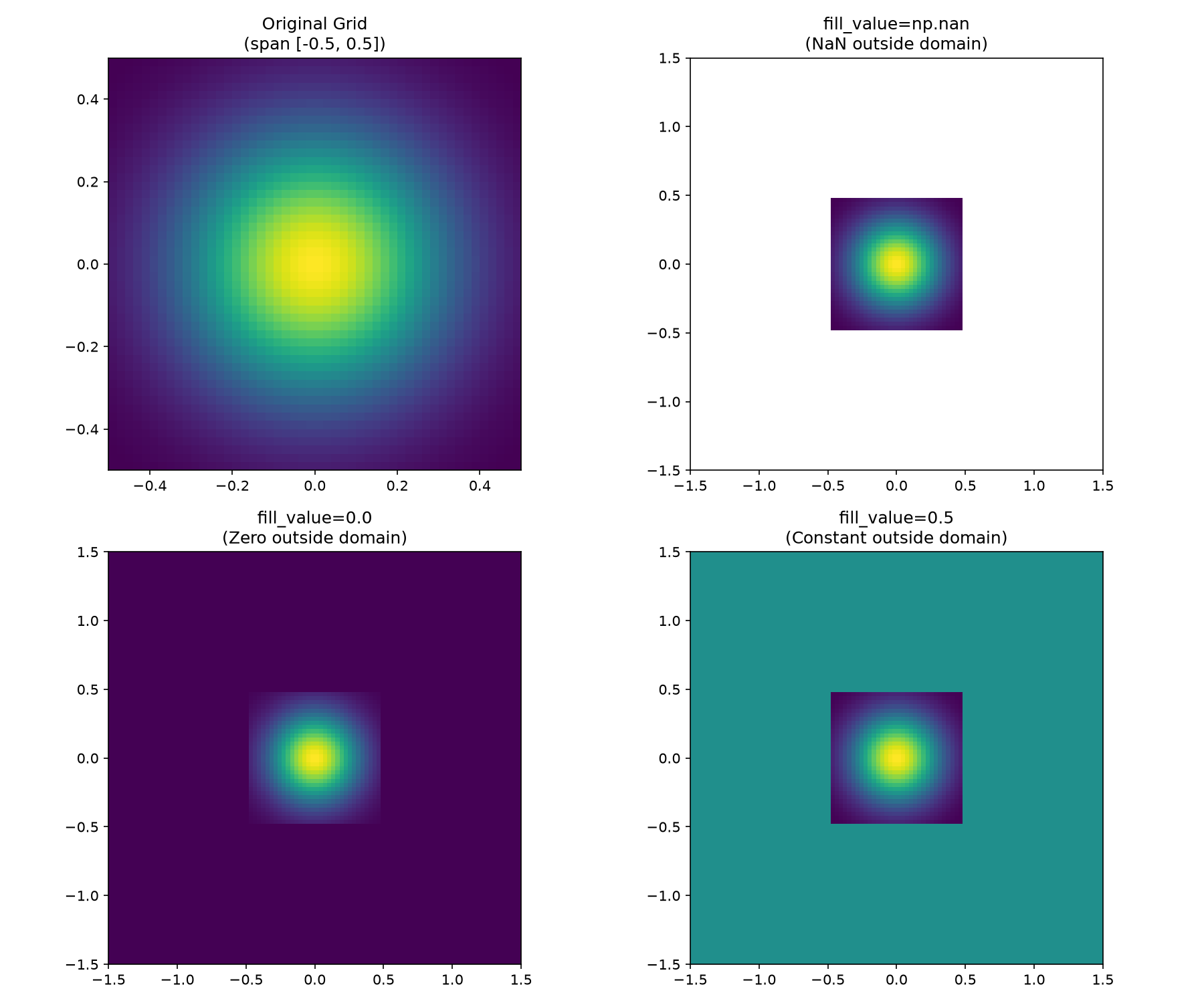
We can see how each fill value behaves: np.nan makes out-of-bounds
regions invisible in imshow plots (rendered as white), which is useful
for diagnostic plots where we want to clearly mark the valid
interpolation domain. Using fill_value=0.0 is natural for amplitude
fields that are zero outside the pupil — a common case in optics. A
constant like 0.5 demonstrates that any value can be used, though it
rarely has physical meaning unless the field is known to plateau outside
the sampled region.
The key point: linear interpolation does not extrapolate. Points outside the convex hull of the input grid always receive the fill value, so we choose it to match our knowledge of the field beyond the sampled domain.
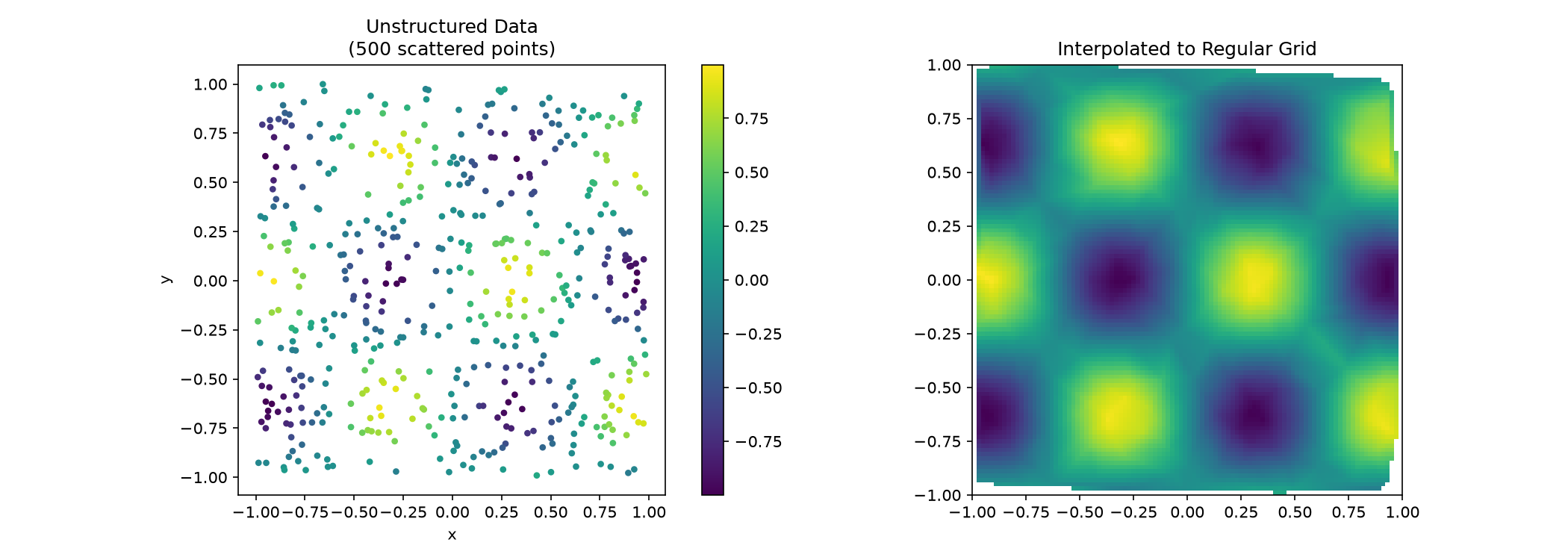
We can also interpolate from unstructured grids with scattered data points onto a regular grid. This is common when dealing with measurement data that arrives at irregular positions, such as wavefront sensor measurements or randomly placed actuators.
We’ll create 500 random points within [-1, 1] with values following a sinusoidal pattern, then interpolate onto a 100×100 regular grid.
# Unstructured grid of scattered points
np.random.seed(42)
n_points = 500
x_scattered = np.random.uniform(-1, 1, n_points)
y_scattered = np.random.uniform(-1, 1, n_points)

coords = hcipy.UnstructuredCoords((x_scattered, y_scattered))
unstructured_grid = hcipy.CartesianGrid(coords)

# Field values
values = np.sin(5 * x_scattered) * np.cos(5 * y_scattered)
unstructured_field = hcipy.Field(values, unstructured_grid)
The scattered field is created. Now let’s build a linear interpolator from these irregular points and evaluate it on a regular grid.
# Regular target grid
regular_grid = hcipy.make_pupil_grid(100, 2.0)

# Interpolate to regular grid
interpolator_unstruct = hcipy.make_linear_interpolator(unstructured_field)
regular_field = interpolator_unstruct(regular_grid)
The interpolation is complete. Let’s compare the scattered input points with the resulting regular grid.
# Visualize
fig, axes = plt.subplots(1, 2, figsize=(14, 5))

# Scattered data
sc = axes[0].scatter(x_scattered, y_scattered, c=values, cmap='viridis', s=10)
axes[0].set_aspect('equal')
axes[0].set_title(f'Unstructured Data\n({n_points} scattered points)')
axes[0].set_xlabel('x')
axes[0].set_ylabel('y')
plt.colorbar(sc, ax=axes[0])

# Interpolated field
hcipy.imshow_field(regular_field, ax=axes[1])
axes[1].set_title('Interpolated to Regular Grid')

plt.tight_layout()
plt.show()

print(f"Unstructured grid size: {unstructured_grid.size} points")
print(f"Regular grid size: {regular_grid.size} points")
Unstructured grid size: 500 points
Regular grid size: 10000 points
We can see that the interpolator fills in the gaps between the scattered
points, reconstructing the smooth sinusoidal pattern. The reconstruction
quality depends on the density and distribution of the input points —
regions with sparse coverage show more interpolation artifacts. The
Delaunay-based approach handles non-convex hulls gracefully: points
outside the convex hull of the input data receive the default
fill_value (np.nan), visible as small gaps near the corners of
the interpolated plot.