Getting Started
Welcome to HCIPy! This guide will help you get oriented with the framework.
HCIPy is a framework written in Python for high contrast imaging simulation work. It implements adaptive optics simulation, coronagraphy and optical diffraction calculations.
Installation
You can install HCIPy using pip:
pip install hcipy
or using conda via conda-forge:
conda install conda-forge::hcipy
For more detailed instructions, see the installation guide.
Your First Simulation
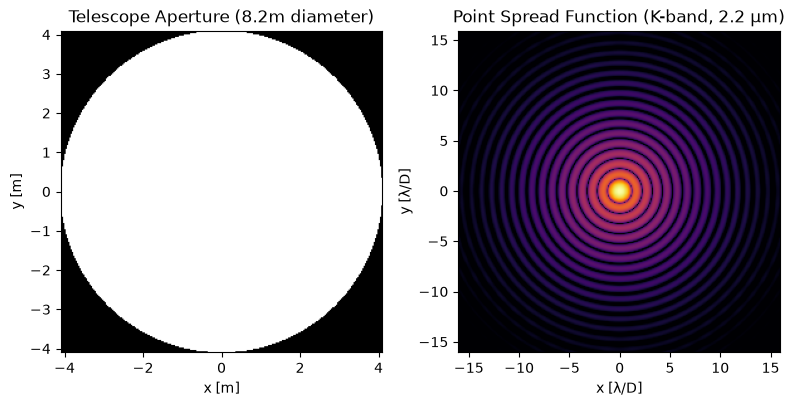
Run the code below to simulate a circular telescope aperture and calculate its PSF. Don’t worry about the details yet; we’ll explain each step in the next section.
[1]:
# Step 1: Import HCIPy and other libraries
import hcipy
import numpy as np
import matplotlib.pyplot as plt

# Step 2: Create a computational grid
# This defines where we calculate the optical field
pupil_diameter = 8.2  # meter
grid = hcipy.make_pupil_grid(256, pupil_diameter)  # 256x256 grid spanning 8.2 meters (VLT diameter)

# Step 3: Create a circular aperture
# This represents the telescope pupil
aperture = hcipy.make_circular_aperture(pupil_diameter)(grid)

# Step 4: Create a wavefront
# This represents starlight entering the telescope
wavelength = 2.2e-6  # 2.2 microns (K-band) in meters
wf = hcipy.Wavefront(aperture, wavelength)

# Step 5: Create a focal plane grid for the PSF
# q=8 gives 8 pixels per resolution element (λ/D)
spatial_resolution = wavelength / pupil_diameter
focal_grid = hcipy.make_focal_grid(q=8, num_airy=16, spatial_resolution=spatial_resolution)

# Step 6: Propagate to the focal plane
prop = hcipy.FraunhoferPropagator(grid, focal_grid)
psf = prop(wf).intensity

# Step 7: Visualize the results
fig, axes = plt.subplots(1, 2, figsize=(8, 4))

# Plot the aperture
hcipy.imshow_field(aperture, grid=grid, ax=axes[0], cmap='gray')
axes[0].set_title('Telescope Aperture (8.2m diameter)')
axes[0].set_xlabel('x [m]')
axes[0].set_ylabel('y [m]')

# Plot the PSF (log scale to see faint features)
hcipy.imshow_field(np.log10(psf / psf.max()), grid=focal_grid, ax=axes[1], vmin=-5, cmap='inferno', grid_units=spatial_resolution)
axes[1].set_title('Point Spread Function (K-band, 2.2 μm)')
axes[1].set_xlabel('x [λ/D]')
axes[1].set_ylabel('y [λ/D]')

plt.tight_layout()
plt.show()
What Just Happened?
Let’s break down the code step by step:
Step 2: The Grid
grid = make_pupil_grid(256, pupil_diameter)
A Grid defines where in space we calculate optical quantities. Think of it as the “pixels” of your simulation. Here we create a 256x256 grid spanning 8.2 meters, the diameter of the VLT’s primary mirror. Grids are the workhorse of HCIPy and you’ll use them to define your sampling in every optical plane in your simulations.
Step 3: The Aperture
aperture = make_circular_aperture(pupil_diameter)(grid)
An aperture represents the physical opening through which light enters the telescope. For a simple circular mirror, it’s 1 inside the mirror and 0 outside. Note the double parentheses here: make_circular_aperture(pupil_diameter) returns a function that takes a grid as input and returns an aperture mask. We then call (i.e. evaluate) that function with the grid we defined above.
Step 4: The Wavefront
wf = Wavefront(aperture, wavelength)
A Wavefront represents the electromagnetic field of light. It stores:
Electric Field: The electric field amplitude and phase at each grid point.
Wavelength: The color of light (2.2 μm = K-band near-infrared)
Step 5-6: Propagation and the PSF
prop = FraunhoferPropagator(grid, focal_grid)
psf = prop(wf).intensity
Fraunhofer propagation calculates how light diffracts as it travels from the pupil to the focal plane. Internally, this uses Fourier transforms to compute the resulting diffraction pattern.
The result is the Point Spread Function (PSF)—the image of a point source (star). The PSF shows:
Airy disk: The central bright spot (diffraction-limited resolution)
Diffraction rings: Concentric rings from wave interference
Step 7: Visualization
imshow_field(np.log10(psf / psf.max()), grid=focal_grid, grid_units=spatial_resolution)
grid_units controls the axis scaling: here spatial_resolution = \lambda / D (the diffraction limit), so tick labels are in units of \(\lambda/D\).
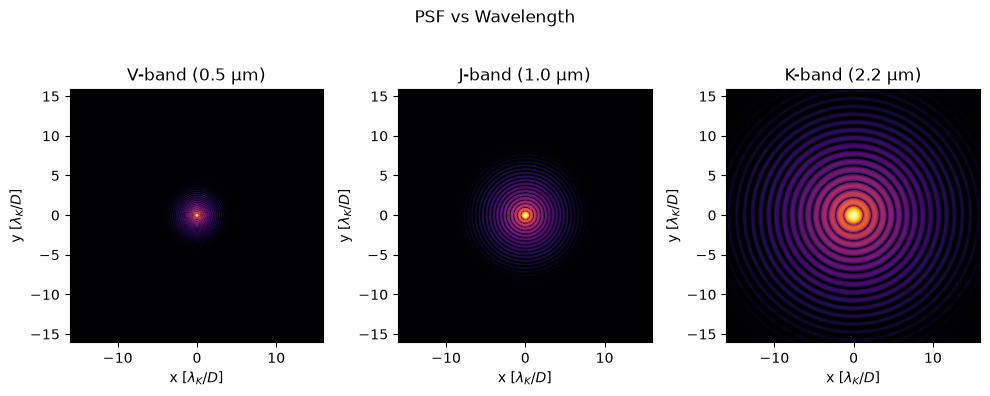
Experiment: Wavelength Dependence
Let’s see how the PSF changes with wavelength. In astronomy, shorter wavelengths (blue) give better angular resolution than longer wavelengths (red).
[2]:
# Compare PSFs at different wavelengths
wavelengths = [0.5e-6, 1.0e-6, 2.2e-6]  # V, J, and K bands in meters
labels = ['V-band (0.5 μm)', 'J-band (1.0 μm)', 'K-band (2.2 μm)']

fig, axes = plt.subplots(1, 3, figsize=(10, 4))

for i, (wl, label, ax) in enumerate(zip(wavelengths, labels, axes)):
    # Create wavefront at this wavelength
    wf = hcipy.Wavefront(aperture, wl)

    # Propagate
    psf = prop(wf).intensity

    # Plot
    hcipy.imshow_field(np.log10(psf/psf.max()), ax=ax, vmin=-5, cmap='inferno', grid_units=spatial_resolution)
    axes[i].set_title(label)
    axes[i].set_xlabel(r'x [$\lambda_K / D$]')
    axes[i].set_ylabel(r'y [$\lambda_K / D$]')

plt.suptitle('PSF vs Wavelength')
plt.tight_layout()
plt.show()
Using a Real Telescope Pupil
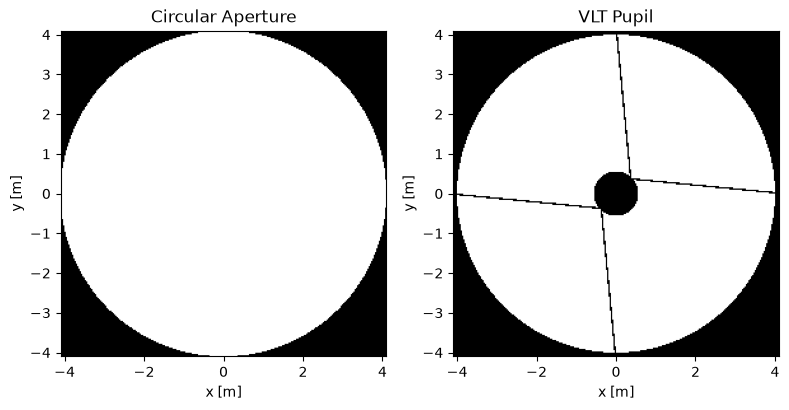
Let’s replace the simple circular aperture with the actual VLT pupil, which includes the central obscuration (secondary mirror) and spiders. The make_vlt_aperture() function defaults to the VLT’s actual 8.2 m diameter.
[3]:
# Create the actual VLT pupil
vlt_pupil = hcipy.make_vlt_aperture()(grid)

# Create wavefront
wf_vlt = hcipy.Wavefront(vlt_pupil, wavelength)

# Propagate
psf_vlt = prop(wf_vlt).intensity

# Compare
fig, axes = plt.subplots(1, 2, figsize=(8, 5))

# Simple circular aperture
wf_circ = hcipy.Wavefront(aperture, wavelength)
psf_circ = prop(wf_circ).intensity

hcipy.imshow_field(np.log10(psf_circ/psf_circ.max()), ax=axes[0], vmin=-5, cmap='inferno', grid_units=spatial_resolution)
axes[0].set_title('Circular Aperture (no obscuration)')
axes[0].set_xlabel('x [λ/D]')
axes[0].set_ylabel('y [λ/D]')

# VLT pupil
hcipy.imshow_field(np.log10(psf_vlt/psf_vlt.max()), ax=axes[1], vmin=-5, cmap='inferno', grid_units=spatial_resolution)
axes[1].set_title('VLT Pupil (with obscuration and spiders)')
axes[1].set_xlabel('x [λ/D]')
axes[1].set_ylabel('y [λ/D]')

plt.tight_layout()
plt.show()

# Show the pupils themselves
fig, axes = plt.subplots(1, 2, figsize=(8, 5))
hcipy.imshow_field(aperture, ax=axes[0], cmap='gray')
axes[0].set_title('Circular Aperture')
axes[0].set_xlabel('x [m]')
axes[0].set_ylabel('y [m]')
hcipy.imshow_field(vlt_pupil, ax=axes[1], cmap='gray')
axes[1].set_title('VLT Pupil')
axes[1].set_xlabel('x [m]')
axes[1].set_ylabel('y [m]')
plt.tight_layout()
plt.show()
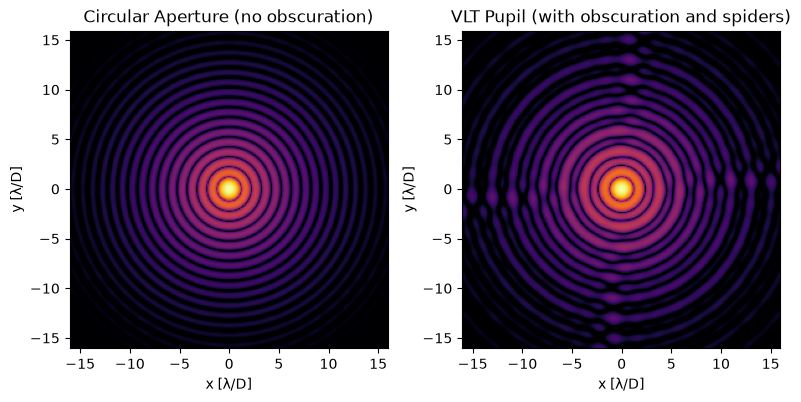
Notice the differences in the PSFs:
The VLT PSF has more complex diffraction structure
Spiders create the cross-shaped pattern
Central obscuration redistributes light in the Airy rings
Next Steps
Now that you understand the basics, continue with these tutorials:
Core Concepts: Grids and Fields: deeper dive into HCIPy’s fundamental data structures.
Core Concepts: Wavefronts and Optical Elements: learn about propagation and aberrations.
Telescope Pupils: explore pupils for other major telescopes (JWST, ELT, etc.).
Atmospheric Simulation: add realistic turbulence to your simulations.
For a complete list of tutorials, see the tutorials page.