
Working with Fourier Transforms
This tutorial explores Fourier transforms in HCIPy, from basic usage to advanced techniques. Fourier transforms are fundamental to optical simulations—they let us propagate light between pupil and focal planes, analyze spatial frequencies, filter images, calculate PSFs and MTFs, and perform image registration via shifts, rotations, and distortions.
We’ll start with the relationship between spatial and frequency domain grids, then move through each transform type with concrete examples.
import hcipy
import numpy as np
import matplotlib.pyplot as plt
The relationship between spatial and frequency domain grids is set by the sampling theorem. In HCIPy, we create a spatial grid first—it defines where we sample our optical fields—and then derive the corresponding Fourier grid from it. The grid spacing and total extent are linked: a finer spatial sampling gives a wider frequency range, and a larger spatial extent gives finer frequency resolution.
# Create a spatial grid
N = 128
spatial_grid = hcipy.make_pupil_grid(N, 2.0)

print("Spatial grid properties:")
print(f"  Dimensions: {spatial_grid.dims}")
print(f"  Spacing: {spatial_grid.delta}")
print(f"  Total extent: {spatial_grid.delta[0] * spatial_grid.dims[0]:.4f}")
Spatial grid properties:
  Dimensions: (128, 128)
  Spacing: [0.015625 0.015625]
  Total extent: 2.0000
The FFT grid has a reciprocal relationship to the spatial grid. The maximum frequency we can represent—the Nyquist frequency—comes from the spatial sampling: \(k_{\text{max}} = \pi / \Delta x\). The frequency resolution comes from the total spatial extent: \(\Delta k = 2\pi / L\). This means a larger aperture (bigger \(L\)) gives finer frequency sampling in the Fourier domain, while finer spatial sampling extends the maximum frequency.
# Create the corresponding FFT grid
fft_grid = hcipy.make_fft_grid(spatial_grid)

print("\nFFT grid properties:")
print(f"  Dimensions: {fft_grid.dims}")
print(f"  Spacing: {fft_grid.delta}")
print(f"  Zero point: {fft_grid.zero}")

# Calculate the relationship
dx = spatial_grid.delta[0]
N = spatial_grid.dims[0]
L = dx * N
df = 2 * np.pi / L  # Frequency spacing

print(f"\nTheoretical relationships:")
print(f"  Spatial extent L = {L:.4f}")
print(f"  Frequency spacing df = 2π/L = {df:.4f}")
print(f"  Maximum frequency = π/dx = {np.pi/dx:.4f}")
FFT grid properties:
  Dimensions: (128, 128)
  Spacing: [3.14159265 3.14159265]
  Zero point: [-201.06192983 -201.06192983]

Theoretical relationships:
  Spatial extent L = 2.0000
  Frequency spacing df = 2π/L = 3.1416
  Maximum frequency = π/dx = 201.0619
We can see that the FFT grid dimensions match the spatial grid, and the spacing follows the \(2\pi / L\) relationship. The zero-point is at the correct location for an FFT-centered grid. This reciprocal relationship is the foundation for all the Fourier transforms that follow.
Let’s visualize the spatial and frequency grids side by side to make the reciprocal relationship concrete.
fig, axes = plt.subplots(1, 2, figsize=(14, 5))

# Plot spatial grid (1D slice)
spatial_1d = spatial_grid.x.reshape(spatial_grid.dims)[N//2, :]
axes[0].plot(spatial_1d, np.zeros(N), 'o', markersize=2, label='Grid points')
axes[0].axvline(x=0, color='red', linestyle='--', alpha=0.5, label='Center')
axes[0].set_xlabel('x')
axes[0].set_ylabel('(zero)')
axes[0].set_title('Spatial Domain Grid (1D slice)')
axes[0].legend()
axes[0].grid(True, alpha=0.3)

# Plot frequency grid points (1D slice)
fft_1d = fft_grid.x.reshape(fft_grid.dims)[N//2, :]
axes[1].plot(fft_1d, np.zeros(N), 'o', markersize=2, label='Grid points')
axes[1].axvline(x=0, color='red', linestyle='--', alpha=0.5, label='Center')
axes[1].set_xlabel('Spatial frequency (k)')
axes[1].set_ylabel('(zero)')
axes[1].set_title('Frequency Domain Grid (1D slice)')
axes[1].legend()
axes[1].grid(True, alpha=0.3)

plt.tight_layout()
plt.show()

The spatial grid is centered at zero with 128 points spanning 2 units. The frequency grid is also centered at zero but spans \([-\pi/\Delta x, \pi/\Delta x]\), also with 128 points. The density of samples in each domain is inversely related—this is exactly what the sampling theorem predicts.
We can control the Fourier domain sampling independently from the
spatial domain using two parameters: q (oversampling) and fov
(field of view). The q parameter multiplies the number of samples in
the Fourier domain—higher q means finer frequency sampling at the
cost of a larger grid. The fov parameter scales the extent of the
Fourier domain—smaller fov crops the field of view, producing fewer
samples and faster computation, but risks aliasing if the field is too
small. Together they let us trade off resolution, field size, and speed.
Let’s demonstrate with a circular aperture.
# Create an aperture
aperture = hcipy.make_circular_aperture(0.5)(spatial_grid)

# Different FFT grid configurations
configs = [
    (1, 1, 'Critical sampling'),
    (2, 1, '2x oversampling'),
    (1, 0.5, 'Half FOV'),
    (2, 0.5, '2x oversampling, half FOV')
]
Now we’ll create FFT grids and propagators for each configuration and visualize the resulting focal-plane field.
fig, axes = plt.subplots(2, 2, figsize=(14, 12))
axes = axes.flatten()

for idx, (q, fov, title) in enumerate(configs):
    # Create FFT grid
    fft_grid_config = hcipy.make_fft_grid(spatial_grid, q=q, fov=fov)

    # Create FFT
    fft = hcipy.FastFourierTransform(spatial_grid, q=q, fov=fov)

    # Compute FFT
    wf = hcipy.Wavefront(aperture)
    focal_field = fft.forward(wf.electric_field)

    # Plot
    im = hcipy.imshow_field(np.log10(np.abs(focal_field)**2 / (np.abs(focal_field)**2).max()), vmin=-10, grid=fft_grid_config, ax=axes[idx])
    axes[idx].set_title(f'{title}\nq={q}, fov={fov}\nGrid: {fft_grid_config.dims}')
    plt.colorbar(im, ax=axes[idx])

plt.tight_layout()
plt.show()
The effect is clear: at critical sampling (q=1, fov=1), the focal
plane just fits the Airy pattern. With q=2, we get twice as many
samples across the same field—a smoother rendering of the PSF. Reducing
fov to 0.5 halves the field shown, which is fine if we only care
about the core of the PSF and want faster computation. In physical
terms, q controls the sampling density in the focal plane while
fov controls the total extent.
HCIPy provides several Fourier transform implementations.
FastFourierTransform uses the FFT algorithm—O(N log N) and very
fast—but requires the output grid to be a regularly-spaced FFT grid
derived from the input grid. MatrixFourierTransform uses direct
matrix multiplication—O(N²) and slower—but accepts any arbitrary output
grid, giving complete flexibility. The choice is speed versus
generality.
Let’s compare them head-to-head.
from hcipy.fourier import FastFourierTransform, MatrixFourierTransform
import time

# Create test field
grid_256 = hcipy.make_pupil_grid(256)
aperture_256 = hcipy.make_circular_aperture(1)(grid_256)
wf_256 = hcipy.Wavefront(aperture_256)
First, the FFT on its native grid. We’ll time 10 forward transforms and take the average.
# Test 1: FFT (native grid)
fft_grid_native = hcipy.make_fft_grid(grid_256)
fft = hcipy.FastFourierTransform(grid_256)

start = time.time()
for _ in range(10):
    result_fft = fft.forward(wf_256.electric_field)
fft_time = (time.time() - start) / 10
Now the MFT with a custom output grid—arbitrary size and spacing. The flexibility comes at a computational cost.
# Test 2: MFT (arbitrary output grid)
custom_output_grid = hcipy.make_pupil_grid(300, 15.0)
mft = hcipy.MatrixFourierTransform(grid_256, custom_output_grid)

start = time.time()
for _ in range(10):
    result_mft = mft.forward(wf_256.electric_field)
mft_time = (time.time() - start) / 10
Let’s look at the timing comparison and the resulting fields side by side.
print(f"FFT time: {fft_time*1000:.2f} ms")
print(f"MFT time: {mft_time*1000:.2f} ms")
print(f"MFT/FFT time ratio: {mft_time/fft_time:.1f}x")

# Visualize
fig, axes = plt.subplots(1, 2, figsize=(14, 6))

hcipy.imshow_field(np.log10(np.abs(result_fft)**2 / (np.abs(result_fft)**2).max()),
             vmin=-10, grid=fft_grid_native, ax=axes[0])
axes[0].set_title(f'FFT (native grid)\n{fft_grid_native.dims} pixels')

hcipy.imshow_field(np.log10(np.abs(result_mft)**2 / (np.abs(result_mft)**2).max()),
             vmin=-10, grid=custom_output_grid, ax=axes[1])
axes[1].set_title(f'MFT (custom grid)\n{custom_output_grid.dims} pixels')

plt.tight_layout()
plt.show()
FFT time: 0.52 ms
MFT time: 24.15 ms
MFT/FFT time ratio: 46.4x
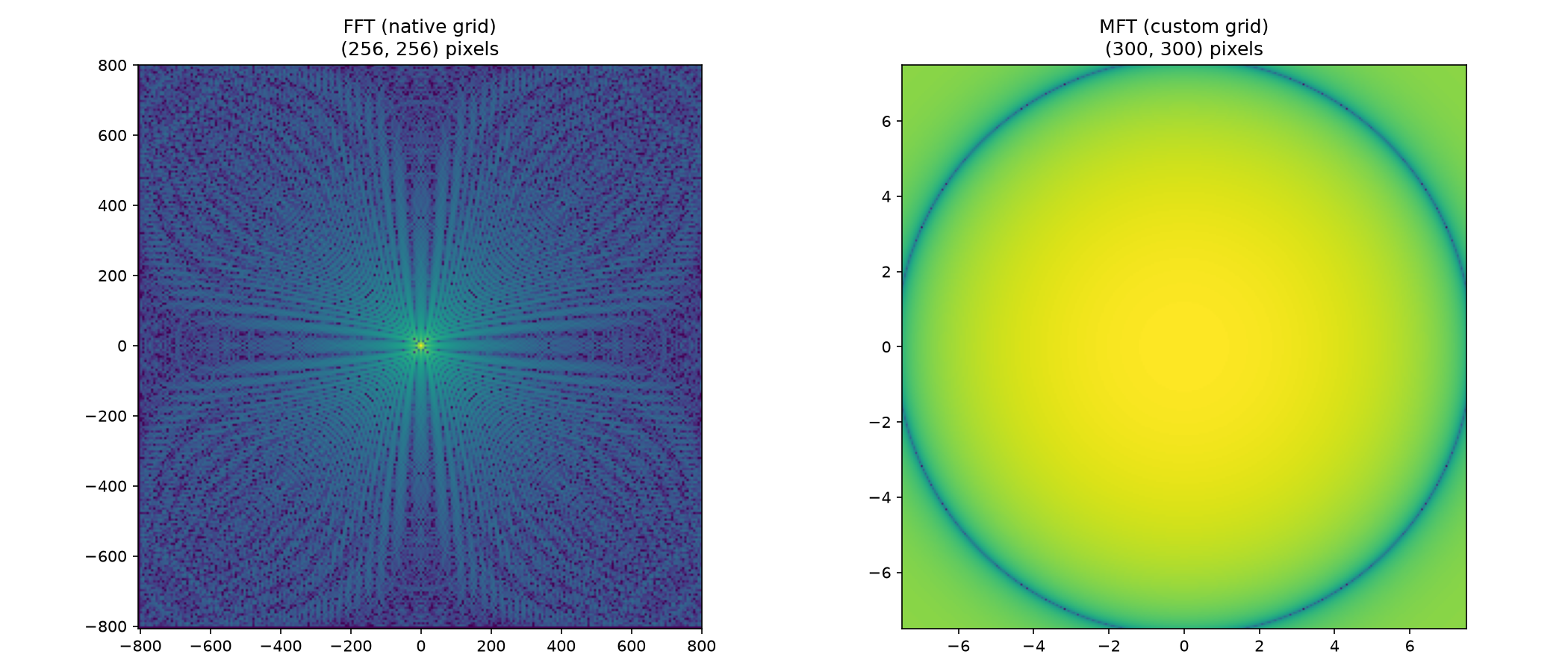
The FFT is dramatically faster—often 10-100× depending on grid size. Use it whenever you can work with the native FFT grid. The MFT shines when you need a non-uniform or oddly-shaped output grid, such as zooming into a small region of the focal plane without computing the full field, or when working with irregular aperture shapes that don’t fit an FFT-friendly grid.
Both FastFourierTransform and MatrixFourierTransform support
.forward() for the transform from spatial to frequency domain and
.backward() for the inverse transform. HCIPy handles the
normalization automatically—no need to multiply by pixel area or grid
spacing manually. The .backward() method undoes .forward() to
within numerical precision.
FourierFilter lets us apply a filter function in the frequency
domain. We provide a function that operates on the internal FFT grid,
and FourierFilter handles the forward transform, filtering, and
inverse transform automatically. The q parameter controls
oversampling for the internal FFT grid, which helps avoid aliasing
artifacts when the filter has sharp features.
from hcipy.fourier import FourierFilter

# Low-pass filter
def low_pass_filter(grid):
    k = np.sqrt(grid.x**2 + grid.y**2)
    cutoff = 20.0
    return hcipy.Field(np.exp(-(k / cutoff)**2), grid)
We’ll create a test field consisting of a smooth Gaussian signal plus high-frequency sinusoidal noise.
# Create a field with noise
grid_128 = hcipy.make_pupil_grid(128)
x = grid_128.x
y = grid_128.y

# Pattern with high-frequency noise
signal = np.exp(-(x**2 + y**2) / 0.1)  # Gaussian
noise = 0.1 * np.sin(2 * np.pi * 10 * x) * np.sin(2 * np.pi * 10 * y)
noisy_field = hcipy.Field(signal + noise, grid_128)
# Apply filter
filt = hcipy.FourierFilter(grid_128, low_pass_filter, q=2)
filtered_field = filt.forward(noisy_field)

# Visualize
fig, axes = plt.subplots(1, 3, figsize=(15, 5))

hcipy.imshow_field(noisy_field, ax=axes[0])
axes[0].set_title('Noisy Input')

fft_grid_internal = filt.internal_grid
filter_field = low_pass_filter(fft_grid_internal)
hcipy.imshow_field(filter_field, ax=axes[1])
axes[1].set_title('Low-Pass Filter\n(Fourier Domain)')

hcipy.imshow_field(filtered_field.real, ax=axes[2])
axes[2].set_title('Filtered Output')

plt.tight_layout()
plt.show()
The low-pass filter attenuates the high-frequency noise while preserving the low-frequency Gaussian signal. In the Fourier domain panel, we can see the filter profile—a Gaussian centered at zero frequency. After filtering, the output is much smoother than the input, with most of the 10-cycle-period ripple removed. The residual noise comes from frequencies below the cutoff.
Shifts, shears, and rotations in the spatial domain correspond to linear
phase ramps, shears, and rotations in the Fourier domain — these are
fundamental properties of the Fourier transform, with the shift theorem
covering translations. HCIPy provides dedicated classes that apply these
transformations efficiently via the frequency domain: FourierShift,
FourierShear, and FourierRotation. These are useful for image
registration, sub-pixel alignment, and distortion correction.
Let’s demonstrate with a simple test pattern.
# Test pattern: letter F
grid_2d = hcipy.make_pupil_grid(128, 2.0)

def f_pattern(grid):
    pattern = grid.zeros()

    vertical_bar = hcipy.make_rectangular_aperture((0.15, 1.15), center=(-0.3, 0))
    top_bar = hcipy.make_rectangular_aperture((0.5, 0.15), center=(0, 0.5))
    middle_bar = hcipy.make_rectangular_aperture((0.5, 0.15), center=(0, 0))

    pattern[vertical_bar(grid) > 0.5] = 1
    pattern[top_bar(grid) > 0.5] = 1
    pattern[middle_bar(grid) > 0.5] = 1

    return pattern

test_pattern = f_pattern(grid_2d)
Now let’s apply a shift, shear, and rotation to the test pattern.
# Apply shift
shifter = hcipy.FourierShift(grid_2d, [0.2, 0.3])
shifted = shifter.forward(test_pattern)

# Apply shear
shearer = hcipy.FourierShear(grid_2d, shear=0.3, shear_dim=0)
sheared = shearer.forward(test_pattern)

# Apply rotation
rotator = hcipy.FourierRotation(grid_2d, angle=np.pi/6)
rotated = rotator.forward(test_pattern)
Each transform is created once and applied via .forward().
# Visualize
fig, axes = plt.subplots(2, 2, figsize=(12, 12))

hcipy.imshow_field(test_pattern, ax=axes[0,0], cmap='gray')
axes[0,0].set_title('Original F Pattern')

hcipy.imshow_field(shifted.real, ax=axes[0,1], cmap='gray')
axes[0,1].set_title('Shifted by (0.2, 0.3)')

hcipy.imshow_field(sheared.real, ax=axes[1,0], cmap='gray')
axes[1,0].set_title('Sheared (x-direction)')

hcipy.imshow_field(rotated.real, ax=axes[1,1], cmap='gray')
axes[1,1].set_title('Rotated by 30°')

plt.tight_layout()
plt.show()
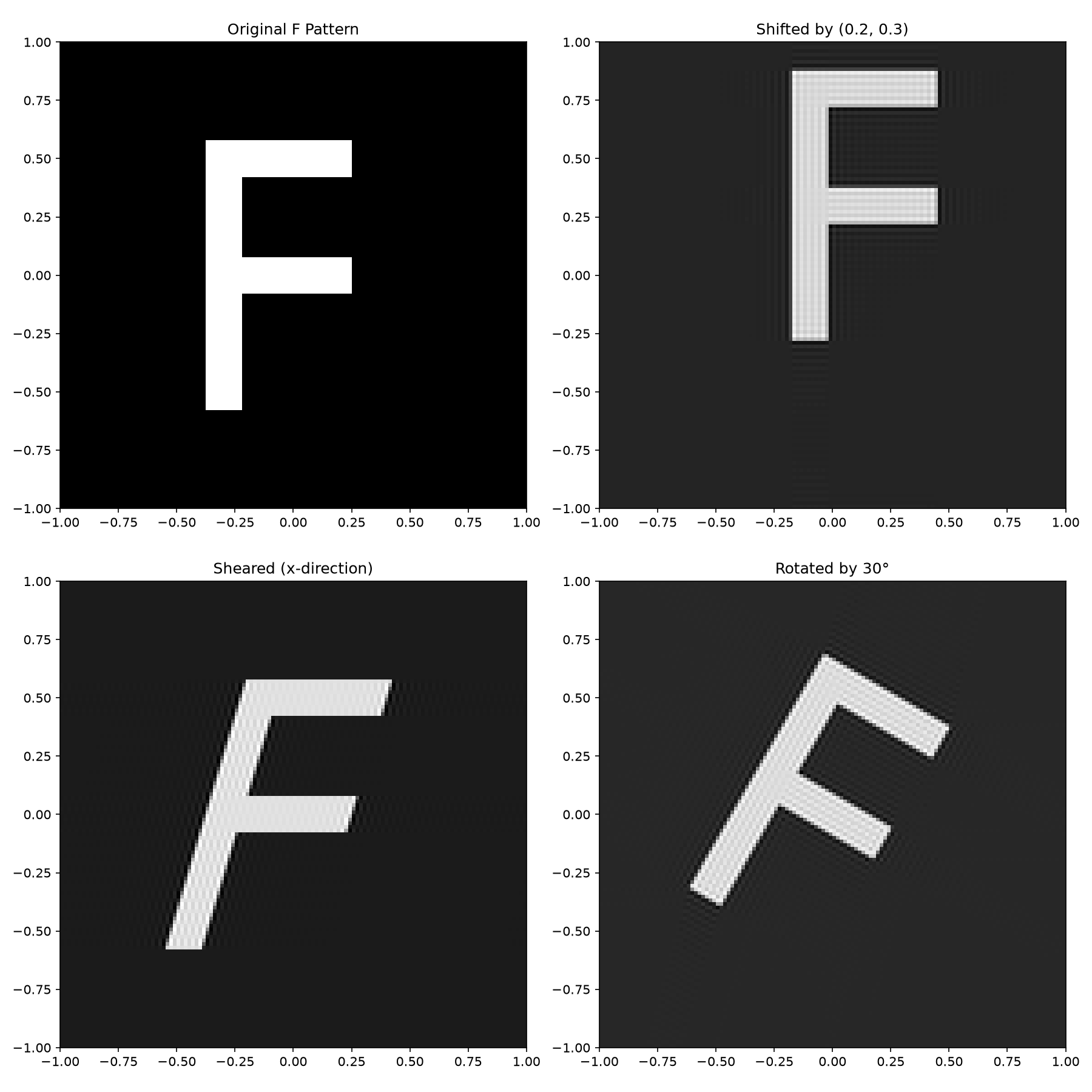
Each operation modifies the F pattern as expected: the shift moves it to a new position, the shear skews it along one axis, and the rotation turns it by 30 degrees. The slight artifacts at the edges come from the periodic boundary conditions inherent in FFT-based transforms—padding the input grid helps reduce these in practice.
As a practical example, let’s calculate the Modulation Transfer Function (MTF) of a square-aperture optical system. The MTF describes how contrast is transferred from the object to the image as a function of spatial frequency—it’s one of the most important metrics for characterizing an optical system’s resolution.
# Create optical system
pupil_grid = hcipy.make_pupil_grid(256, 2.0)

# Square aperture
aperture = hcipy.make_rectangular_aperture([1.0, 1.0])(pupil_grid)

# FFT for PSF
focal_grid = hcipy.make_fft_grid(pupil_grid, q=2)
fft = hcipy.FastFourierTransform(pupil_grid, q=2)

# Calculate PSF
wf = hcipy.Wavefront(aperture)
psf = np.abs(fft.forward(wf.electric_field))**2
psf /= psf.max()
The MTF is the normalized magnitude of the Fourier transform of the PSF. We’ll compute it by taking another Fourier transform of the PSF itself.
# Calculate MTF
mtf_grid = hcipy.make_fft_grid(focal_grid)
fft_for_mtf = hcipy.FastFourierTransform(focal_grid)
mtf_complex = fft_for_mtf.forward(psf)
mtf = np.abs(mtf_complex) / np.abs(mtf_complex).max()
Now let’s visualize the pupil, PSF, and MTF side by side.
# Plot results
fig, axes = plt.subplots(1, 3, figsize=(18, 5))

# Pupil
hcipy.imshow_field(aperture, ax=axes[0], cmap='gray')
axes[0].set_title('Square Aperture (Pupil)')

# PSF
hcipy.imshow_field(np.log10(psf), vmin=-5, grid=focal_grid, ax=axes[1])
axes[1].set_title('Point Spread Function (log scale)')

# MTF
hcipy.imshow_field(mtf, grid=mtf_grid, ax=axes[2])
axes[2].set_title('Modulation Transfer Function')

plt.tight_layout()
plt.show()
/tmp/ipykernel_3515/4071187771.py:9: RuntimeWarning: divide by zero encountered in log10
  hcipy.imshow_field(np.log10(psf), vmin=-5, grid=focal_grid, ax=axes[1])
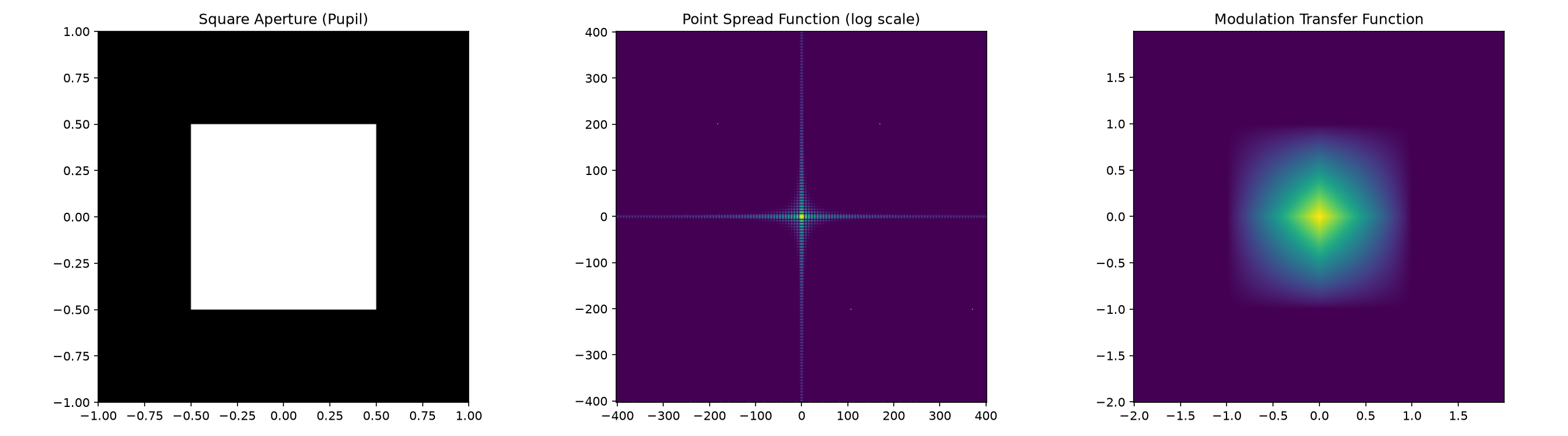
The MTF shows how contrast is transferred at different spatial frequencies. For our square aperture, the MTF drops linearly from 1 at zero frequency to 0 at the cutoff frequency—a triangular shape characteristic of a sinc² PSF (the Fourier transform of a square). The MTF tells us the finest detail the optical system can resolve and how contrast degrades at smaller spatial scales.
When performing many transforms with different configurations, we can
use make_fourier_transform() to automatically select the best
algorithm based on the requested field of view and oversampling. This is
convenient for writing grid-agnostic simulation code that adapts to the
situation.
from hcipy.fourier import make_fourier_transform
import time

# Large grid
grid_large = hcipy.make_pupil_grid(1024)
field = grid_large.zeros(dtype='complex')
With the full field of view (fov=1), the output grid is compatible
with the FFT, so make_fourier_transform selects the fast algorithm.
# Full FOV: FFT
fft_transform = hcipy.make_fourier_transform(grid_large, fov=1)
print(f"Full FOV (fov=1): {type(fft_transform).__name__}")
print(f"  Output grid: {fft_transform.output_grid.dims}")
Full FOV (fov=1): FastFourierTransform
  Output grid: (1024, 1024)
With a small, highly-sampled region (fov=1/32, q=4), the output grid
no longer matches an FFT-friendly layout, so the MFT is automatically
selected.
# Zoomed region: MFT
mft_transform = hcipy.make_fourier_transform(grid_large, fov=1/32, q=4)
print(f"\nZoomed FOV (fov=1/32, q=4): {type(mft_transform).__name__}")
print(f"  Output grid: {mft_transform.output_grid.dims}")
Zoomed FOV (fov=1/32, q=4): MatrixFourierTransform
  Output grid: (128, 128)
make_fourier_transform automatically picks the right tool for the
job. When the full field of view is requested, the grid is
FFT-compatible and the fast algorithm wins. When zooming into a small
region with high oversampling, the MFT is selected because the
non-standard grid can’t use the FFT efficiently. This auto-selection
makes it easy to write grid-agnostic simulation pipelines.